
Guide
CRM database: what it stores and how to keep it clean
A CRM database is the set of linked records that a CRM keeps about your contacts, companies, deals, and the activity between you and them. It replaces scattered lists with one place your team can search. A spreadsheet holds rows; a CRM database connects them, so one company shows every person, deal, and email attached to it. honestcrm is a cloud-based CRM for small business, and it keeps this database for your team.
What a CRM database stores
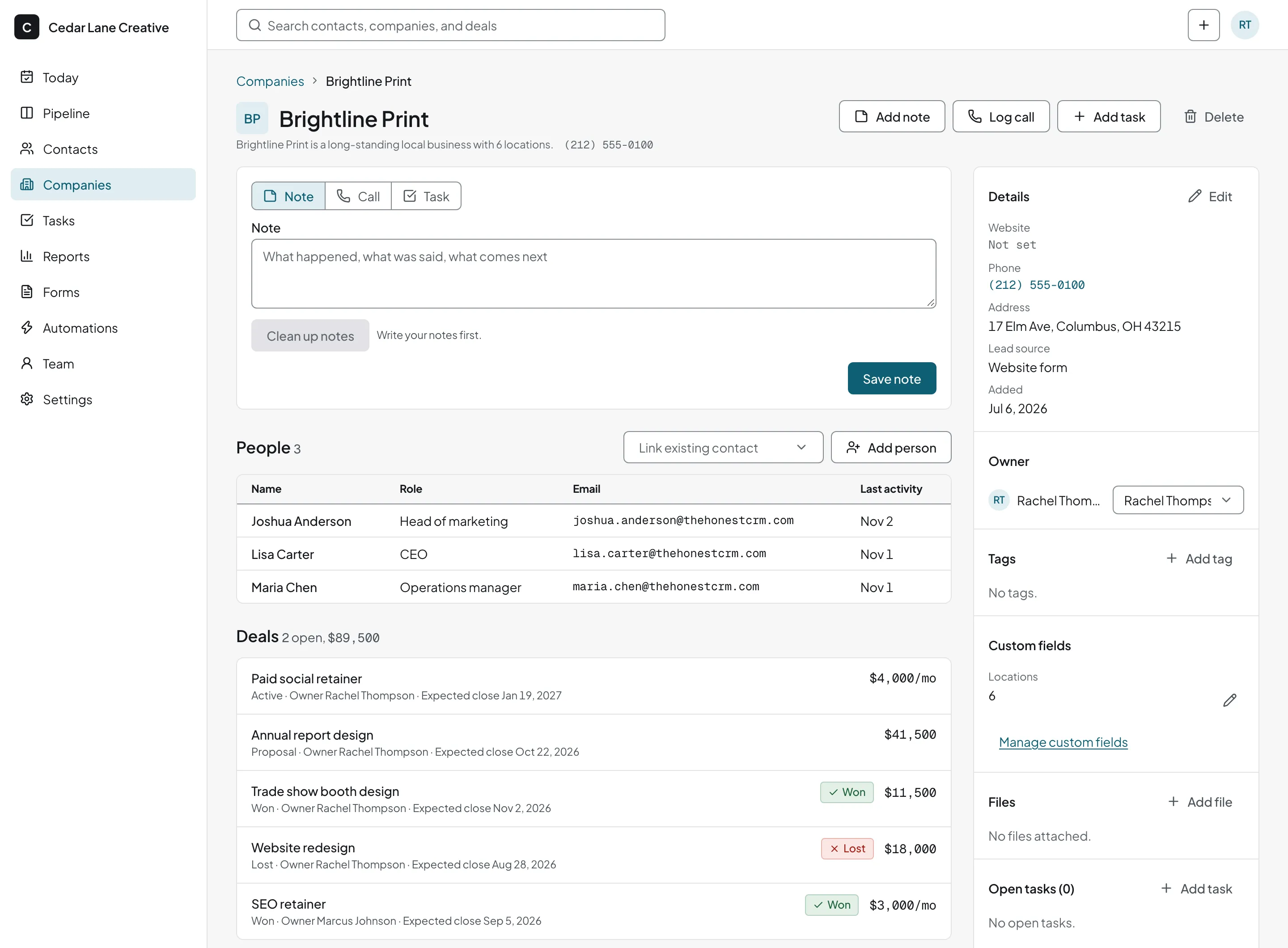
The links matter as much as the records. Open a company and you see its people, their deals, and every conversation. This is the idea behind contact management software and customer database software.
- Contacts. People, with names, email addresses, phone numbers, and any custom fields you add.
- Companies. Organizations, linked to the people who work there.
- Deals. Opportunities with a value and a stage, linked to a contact and company. See the sales pipeline guide.
- Activities. Emails, calls, notes, and tasks, shown as a timeline on each record.
CRM database vs spreadsheet
- Links. A spreadsheet row stands alone. A CRM links people, companies, and deals.
- History. A CRM records each email, call, and note against the contact. A spreadsheet has no timeline of emails or calls.
- Sharing. A CRM lets several people edit at once with an owner on each record.
- Duplicates. A CRM can flag two records for the same person. A spreadsheet needs a manual search.
A spreadsheet works for a short list kept by one person. See the Google Sheets CRM guide for when to move on.
How to set up a CRM database
Decide your fields
Keep the fields you will use, such as name, email, company, and lead source. Add custom fields for facts that matter to your business.
Gather your lists
Combine spreadsheets, exports, and address books into one file.
Clean the file first
Remove blank rows, fix typos, and use one column for each field.
Import
Upload the file and check how columns map to fields.
Assign owners
Give each record a person responsible for it.
How to keep a CRM database clean
- Merge duplicates early. A person entered twice splits their history in two.
- Limit custom fields. Every field needs someone to fill it in.
- Use tags and lists with fixed names. Agree on spelling before you start.
- Record the lead source. It tells you which channels bring in business.
- Review on a schedule. Check old records and unowned contacts every quarter.
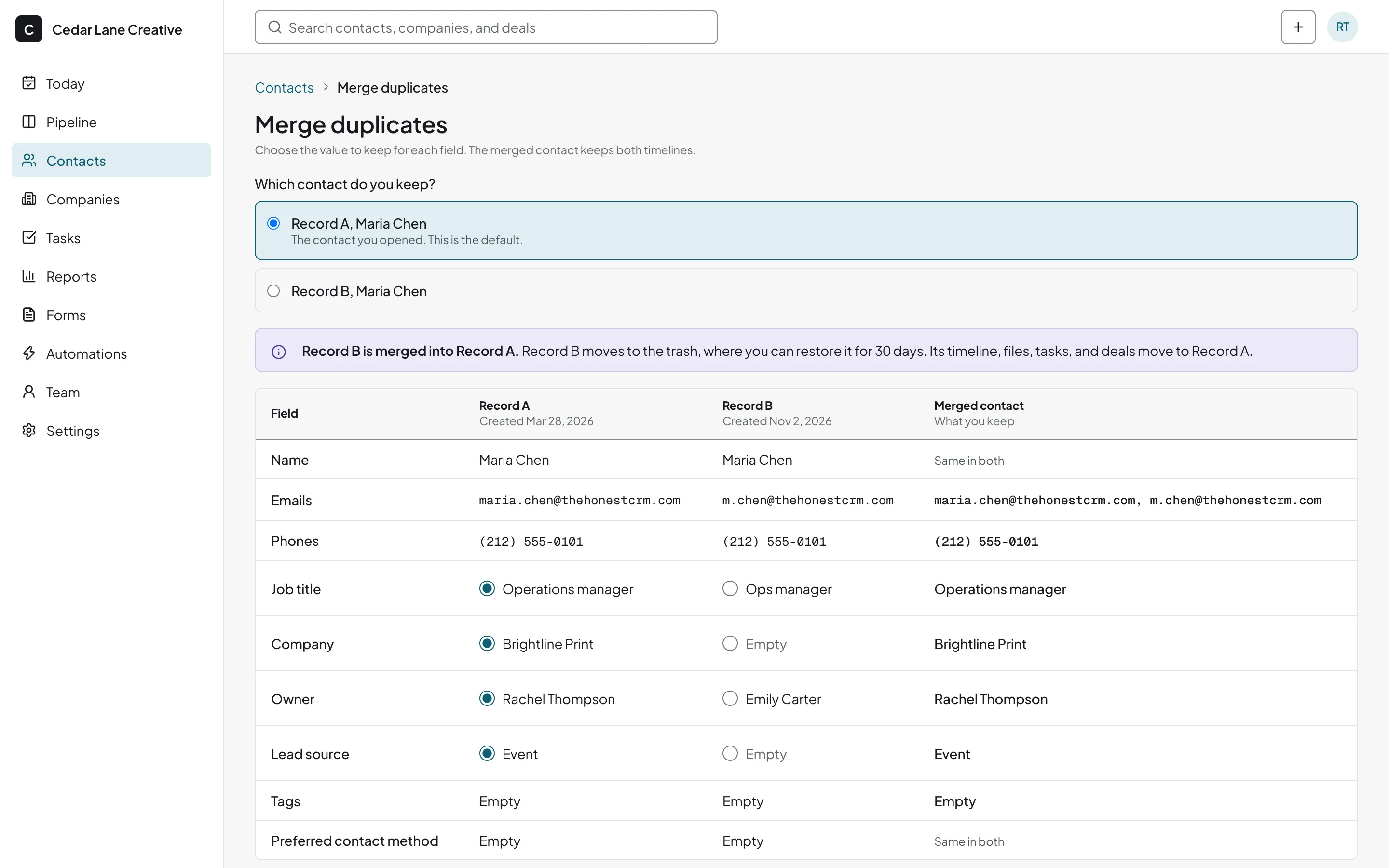
Import, duplicates, and export in honestcrm
- Import. Upload CSV, Excel, or Google Sheets files. The import suggests a column mapping, and you correct it before saving. Presets read exports from Pipedrive, HubSpot, and Less Annoying CRM, including deals and notes.
- Duplicate detection and merge. Duplicates are flagged on import and on the Merge duplicates page, and you choose which record to keep.
- Export. One click exports every record to CSV and JSON. See the features page for more.
Related guides
- Cloud-based CRM
Where the database lives and who looks after it.
- CRM examples
What teams actually store in a CRM database.
- CRM cost calculator
Price the database tools you are comparing.
CRM database questions
What is a CRM database?
A CRM database is the collection of records a CRM keeps about your contacts, companies, deals, and activities, and the links between them. A contact, a company, and a deal are separate records, and each links to the others.
What is the difference between a CRM database and a spreadsheet?
A spreadsheet is a grid of cells. A CRM database links each person to a company, each deal to a person, and each email or task to a record, and it handles access for many users at once. You can still move data between the two with CSV files.
How do I keep a CRM database clean?
Import from a clean file, merge duplicates as soon as they appear, use a small set of consistent fields, and give each record an owner. Review the list on a schedule.
Can I import data into honestcrm?
Yes. Upload a CSV, Excel, or Google Sheets file and check the suggested column mapping. If you are moving from Pipedrive, HubSpot, or Less Annoying CRM, a preset reads that tool's export, deals and notes included.
Can I export my CRM data?
Yes. One click exports every record in your database to CSV and JSON, whenever you want.