
Gmail and Outlook CRM
Gmail CRM: how to connect your Gmail or Outlook mailbox
A Gmail CRM keeps every email with a customer on that customer's record, so anyone on your team can see the history before they reply. honestcrm connects Gmail and Google Workspace mailboxes with a Google app password, and Microsoft 365 (Outlook) mailboxes with a Microsoft sign-in. You can also log email by BCC or forwarding. Setup happens on the Mailbox settings page of honestcrm.
Three ways a CRM connects to Gmail or Outlook
CRMs that work with Gmail use one or more of these methods. The method decides which emails get logged, whether you can send from the CRM, and what you have to set up.
A browser extension
Adds CRM panels inside the Gmail or Outlook tab. It works only in the browser where you installed it, so email you send from your phone needs another route.
A mailbox connection
The CRM reads your inbox and sent mail and sends from your own address, from any device you write on.
BCC or forwarding
You copy a logging address on emails you send, or forward emails you receive. Nothing to connect, but you have to remember it on every email.
A mailbox connection logs email from every device and lets you send from the CRM. honestcrm uses a mailbox connection for Gmail, Google Workspace, and Microsoft 365 (Outlook). BCC and forwarding are a second option.
Create a Gmail app password
Google does not accept your normal account password for IMAP and SMTP. An app password is a separate, 16-character password that you create for one app. It works for both IMAP and SMTP, so each app needs only one.
You can revoke an app password at any time from the same page, and the rest of your Google account is not affected.
Turn on 2-Step Verification
Open your Google account, go to Security, and turn on 2-Step Verification. Google offers app passwords only on accounts that have it.
Open the App passwords page
Go to myaccount.google.com/apppasswords. Google might ask you to sign in again.
Name the password and create it
Enter a name you will recognize later, such as the name of your CRM, and then select Create.
Copy the 16 characters
Google shows the password once, in four groups of four letters. Copy it before you close the window. You can keep or remove the spaces.
Gmail IMAP and SMTP settings
These settings work for Gmail and Google Workspace in any CRM or email app that asks for them.
Gmail IMAP settings
| Setting | Value | Details |
|---|---|---|
| Receiving server (IMAP) | imap.gmail.com | Port 993, SSL/TLS |
| Username | Your full email address | For example, maria@yourcompany.com |
| Password | Your Google app password | The same app password for IMAP and SMTP |
Gmail SMTP settings
| Setting | Value | Details |
|---|---|---|
| Sending server (SMTP) | smtp.gmail.com | Port 465, SSL/TLS. Port 587 with STARTTLS also works. |
| Username | Your full email address | For example, maria@yourcompany.com |
| Password | Your Google app password | The same app password for IMAP and SMTP |
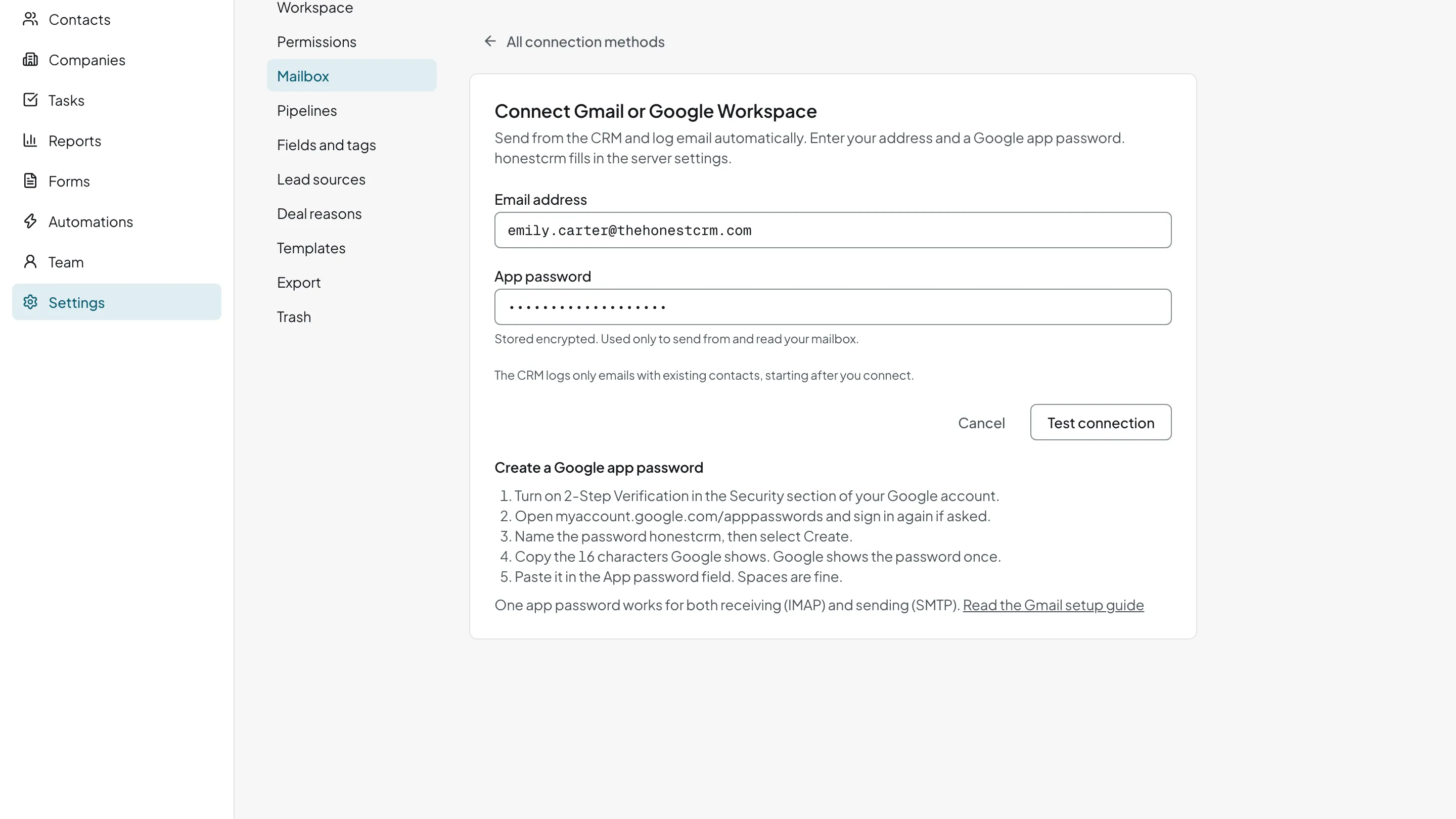
Connect Gmail in honestcrm
In honestcrm, Gmail takes two fields. You do not type a server name or a port.
- Open Settings, then Mailbox.
- Select Connect Gmail.
- Enter your Gmail or Google Workspace address and the app password.
- Select Test connection. honestcrm fills in the Gmail servers and checks sending and receiving.
- When both checks pass, select Save mailbox.
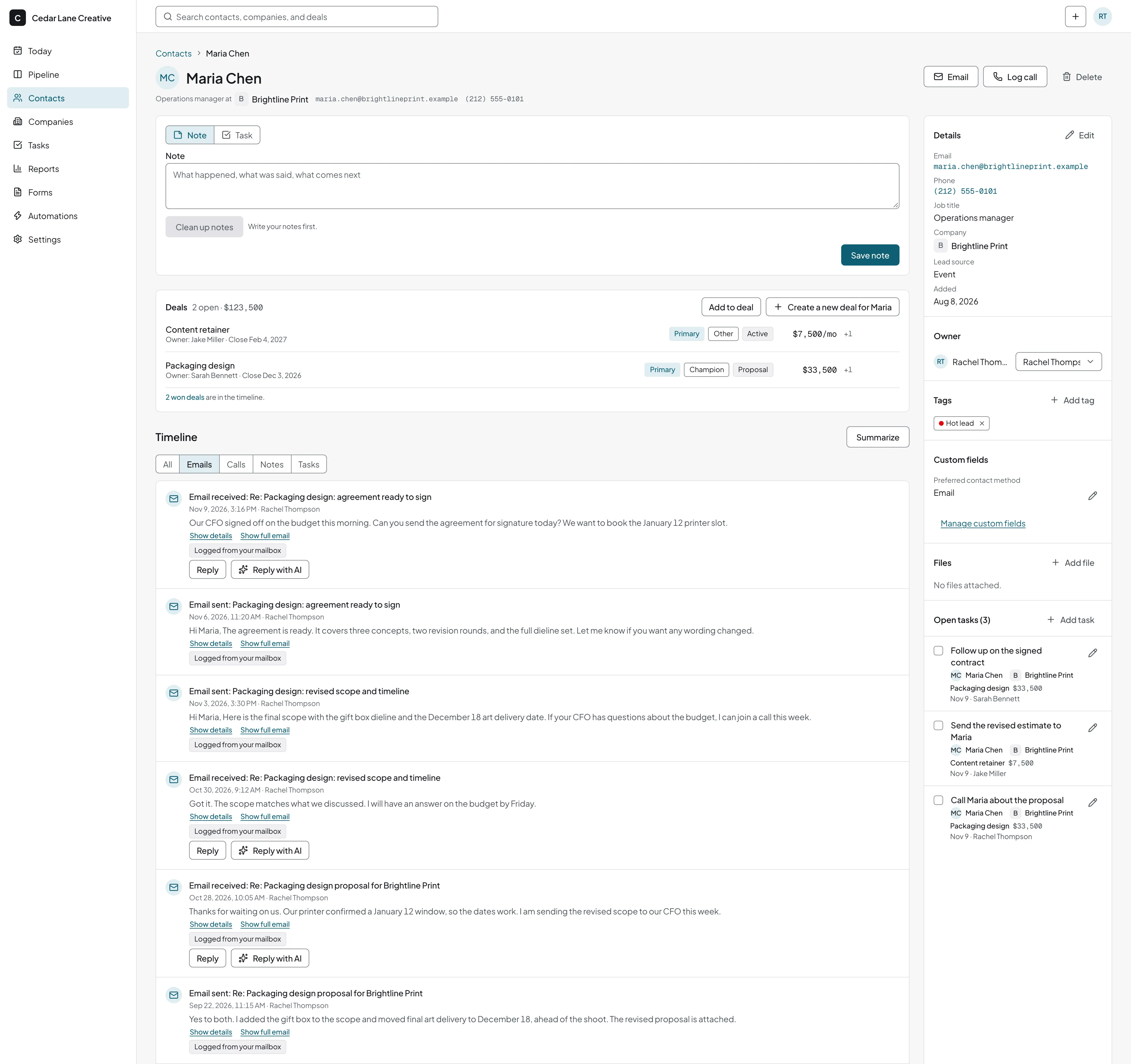
- Emails to and from your contacts appear on their timelines, including email you send from Gmail on your phone.
- Email you send from the CRM goes out from your own Gmail address and lands in your Gmail sent mail.
- Each person on your team connects their own mailbox, and users are unlimited on every plan.
Read how honestcrm protects your mailbox credentials.
Start free and connect Gmail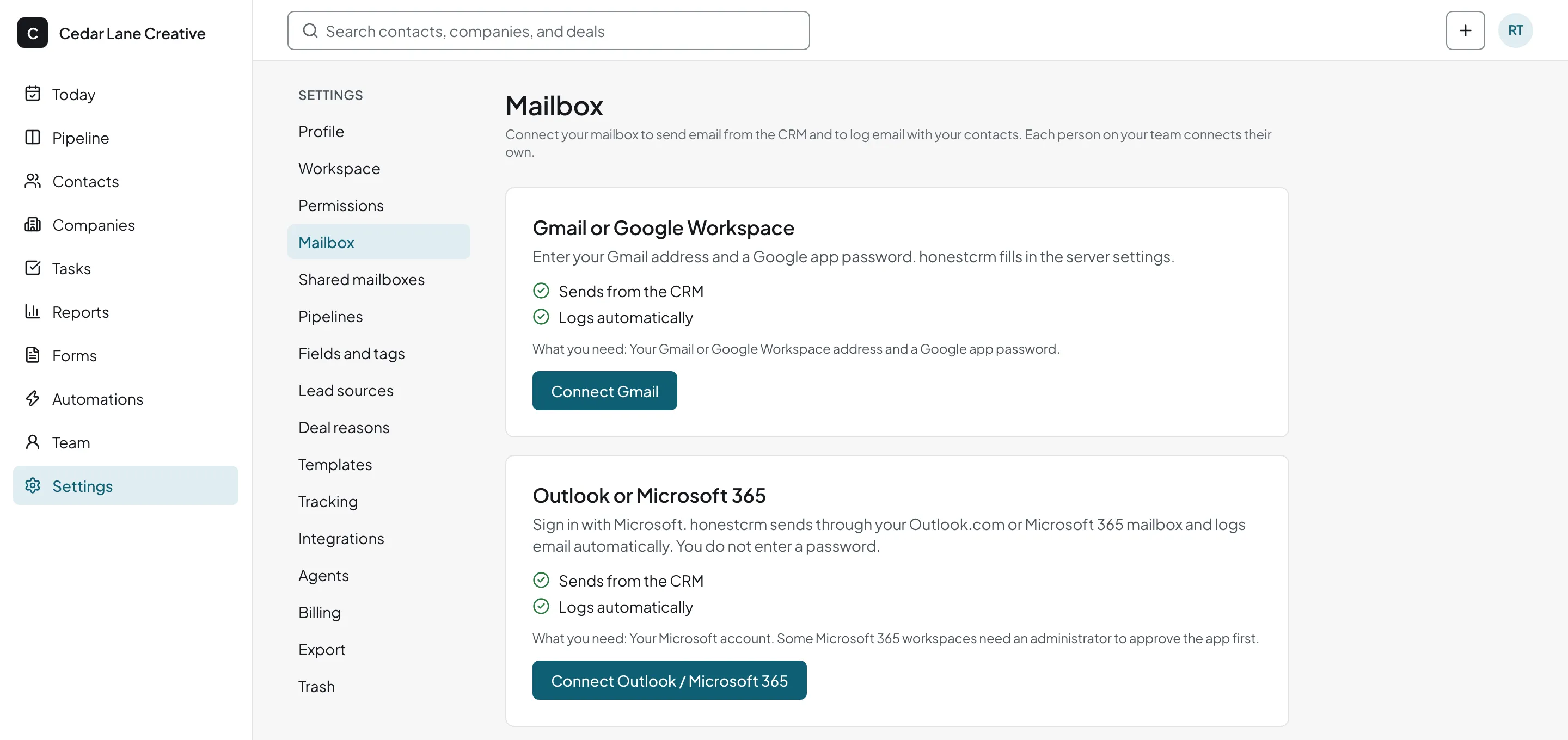
If Gmail rejects the connection
- Sign-in rejected: check that you entered the app password, not your Google password, and that the email address is complete.
- No App passwords page: turn on 2-Step Verification first. On Google Workspace, your administrator might have turned app passwords off. Accounts in Google's Advanced Protection Program cannot create app passwords.
- The connection worked and then stopped: you changed your Google password, or someone revoked the app password. Create a new one and enter it in the CRM.
- You cannot use an app password: log email by BCC or forwarding instead. In honestcrm, copy your personal logging address on the emails you send.
CRM for Outlook and Microsoft 365: connect your mailbox
To use Outlook or Microsoft 365 as your CRM mailbox, sign in with Microsoft. honestcrm never asks for your password. It logs emails to and from your contacts on their timelines and sends from your own address. This works for Outlook.com and Microsoft 365 work or school mailboxes.
- Open Settings, then Mailbox in honestcrm.
- On the Outlook or Microsoft 365 card, select Connect Outlook / Microsoft 365. Your browser opens the Microsoft sign-in page.
- Sign in with the Microsoft account that owns the mailbox, and approve the access that Microsoft shows. honestcrm asks to read and send mail for that mailbox.
- If Microsoft says an administrator must approve the app, ask your administrator to approve honestcrm, and then repeat step 2.
- When Microsoft returns you to honestcrm, honestcrm checks that it can read and send mail, and saves the mailbox when both work.
After you connect, emails to and from your contacts appear on their timelines. Email you send from the CRM goes out from your own address.
If Microsoft rejects the connection
- Your administrator must approve honestcrm: your organization requires an administrator to approve apps before people sign in. Ask your administrator to grant consent for honestcrm in the Microsoft Entra admin center, and then connect again. Until then, log email by BCC or forwarding.
- Microsoft blocked sending from this mailbox: your administrator turned off authenticated SMTP (SMTP AUTH) for your mailbox or organization. Ask your administrator to turn it on for your mailbox in the Microsoft 365 admin center, and then connect again.
- honestcrm cannot read the mailbox: IMAP access might be turned off for it. Ask your administrator to turn it on, and then connect again.
- Microsoft shows a different account: sign in again with the account that owns the mailbox.
- The connection worked and then stopped: Microsoft ended the sign-in, for example after a password change or a policy change. On the Mailbox settings page, select Sign in with Microsoft again.
What you see after you connect
Every email with a contact sits on the contact's timeline with notes and tasks, so the next person who calls knows what was said.
Related guides
- How email logging works
Logging by mailbox, BCC, or forwarding, and email templates.
- How to build a sales pipeline
Once emails are logged, stages tell you which deals need a reply.
- Google Sheets CRM
Your contacts may start in a sheet. Here is how to bring them across.
- CRM for financial advisors
Log Outlook email on each prospect and client.
Gmail and Outlook CRM questions
Is there a free CRM for Gmail?
Yes. The Free plan includes the Gmail CRM integration for every user. Connect your Gmail or Google Workspace mailbox with an app password, and emails to and from your contacts appear on their timelines.
Does one Gmail app password work for both IMAP and SMTP?
Yes. A Google app password replaces your account password for any mail protocol, so the same 16 characters sign in to imap.gmail.com for receiving and smtp.gmail.com for sending. You create one app password for each app that connects.
Does this work with Google Workspace?
Yes. A Google Workspace address connects the same way as a Gmail address. Your Workspace administrator controls whether members can use 2-Step Verification and app passwords. If the App passwords page says the setting is not available, ask your administrator to allow it.
Does honestcrm work as a CRM for Outlook and Microsoft 365?
Yes. On the Mailbox settings page, select Connect Outlook / Microsoft 365 and sign in with your Microsoft account. honestcrm never asks for your password.
Does this work with both Outlook.com and Microsoft 365 work accounts?
Yes. Outlook.com mailboxes and Microsoft 365 work or school mailboxes both connect by signing in with Microsoft. Each person on your team connects their own mailbox.
Is a Gmail app password safe to use in a CRM?
An app password signs in to mail protocols such as IMAP and SMTP. It does not sign in to your Google account in a browser. You can revoke it at any time from the App passwords page, and the rest of your account keeps working. honestcrm stores it encrypted and uses it only to send from and read your mailbox.
What happens if I change my Google password?
Google revokes every app password on the account when you change the account password. Create a new app password and enter it in each app that used the old one. In honestcrm, select Enter new app password on the Mailbox settings page.
Why does honestcrm say my administrator must approve it?
Some Microsoft 365 organizations require an administrator to approve an app before anyone signs in with it. Ask your administrator to grant consent for honestcrm in the Microsoft Entra admin center, and then connect again. Until then, you can log email by BCC or forwarding.
Why does honestcrm say Microsoft blocked sending from my mailbox?
Your administrator turned off authenticated SMTP (SMTP AUTH) for your mailbox or organization. Ask your administrator to turn it on for your mailbox in the Microsoft 365 admin center, and then connect again.
How many emails can I send through Gmail SMTP?
Google sets a daily sending limit for each account. Google's published limits are about 500 recipients a day for a Gmail account and about 2,000 for a Google Workspace account. Email you send from a CRM counts toward that limit, the same as email you send from Gmail.
Which emails does honestcrm log from Gmail?
Emails in your inbox and sent mail that are to or from an existing contact. honestcrm does not create contacts from email. Logging starts when you connect, so emails from before that date stay in Gmail.
Keep working in Gmail or Outlook, and keep the history in your CRM
Connect Gmail, Google Workspace, or Microsoft 365 (Outlook). Free for every user. No card required.
Start for free